Tampilkan postingan dengan label Technology. Tampilkan semua postingan
| 0 komentar ]

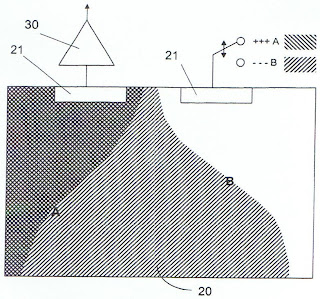
Brainvision Inc. (Tokyo, Japan) and Caeleste (Antwerp, Belgium) have materialized their licence agreement on the design of ToF image sensors based on Caeleste’s patent US7564022. The design collaboration started in December 2010. An image from the first VGA resolution sensor now succesfully demonstrated:


The key advantage of Caeleste patented technology is said to reside in the strict usage of standard, mainstream CMOS technology, leading to lowest possible manufacturing cost. Brainvision and Stanley Electric (Tokyo, Japan) aim to serve the high volume applications such as automotive market and machine vision with Caeleste technology.

Caeleste patent relies on depletion field modulation to implement a fast change of the pixel sensitivity:

Source: http://image-sensors-world.blogspot.com/2011/08/caeleste-and-brainvision-announce-tof.html

| 0 komentar ]


Taking cars off the road with our transportation programs

This is the third in a short series of posts and videos spotlighting our efforts to make Google greener. In this post, we give you a glimpse at how our transportation programs help Googlers get to work while leaving their cars at home. -Ed.

Commuting to work without driving, meeting with someone on another continent without flying and riding cars without gasoline? It's not a futuristic dream, but a way of life at Google. We support and encourage carbon-free commuting because it's a vital part of our longstanding commitment to sustainability.

We help take cars off of the road—not quite like the Hulk, but we are green. Back in 2004, one motivated Googler started a vanpool that ran from San Francisco to Mountain View as a 20 percent project. As demand grew, the program morphed into what is now one of the largest corporate shuttle services in the country. Today, up to a third of employees ride the GBus shuttles throughout our Bay Area offices five days a week—that's more than 3,500 daily riders, or 7,000 one-way car trips avoided each day.


Beyond the convenience and comfort that our shuttle rides offer—of which I'm reminded during my daily 35-mile commute from Alameda to Mountain View—they're also environmentally friendly. Our shuttles have the cleanest diesel engines ever built and run on 5 percent bio-diesel, so they're partly powered by renewable resources that help reduce our carbon footprint. In fact, we're the first and largest company with a corporate transportation fleet using engines that meet the Environmental Protection Agency's 2010 emission standards.

Not only do we encourage self-powered commuting, we reward it. Googlers earn credits each time they get to work via alternative (non-engine) means—by bike, foot, skateboard or kayak. These credits are then translated into a dollar amount that gets donated—$100 for every 20 days of participation—to the Googler's charity of choice. This year, 56 offices also participated in "Bike to Work Day," with more than 2,500 Googlers who biked to work worldwide. The annual celebration is meant to reward daily cyclists as well as introduce many new riders to biking.

The green life doesn't stop once Googlers get to work. In Mountain View, our GBike system distributes about 1,000 bikes across the campus that Googlers can pick up whenever they have to get to another building. For longer distances and off-campus trips, we have the GFleet, our electric vehicle car share program, and our on-campus taxi service GRide. We're also installing hundreds of electric vehicle charging stations throughout several of our offices, making it easy for Googlers to charge up their own electric cars for free at work. If Googlers need to chat with their colleagues in other cities or continents they can use video conferencing technology, which cuts down on potential air travel.

In total, the combination of the GFleet and our shuttles result in net annual savings of more than 5,400 metric tons of CO2. That's like taking over 2,000 cars off the road every day, or avoiding 14 million vehicle miles every year. With the help of Googlers, we'll continue powering the wheels of sustainable transit innovation.

Using technology in crisis preparedness


In many ways, the arrival of Hurricane Irene last week drove home the importance of National Preparedness Month, an effort from the FEMA Ready campaign to encourage Americans to take steps to prepare for emergencies throughout the year. With people relying on the Internet worldwide, it's not surprising that Google search data and a recently released American Red Cross survey show that people turn to online resources and tools for information and communication during major crises. First responders, who provide services in the aftermath of disasters, are also finding Internet and cloud-based tools and information useful—for improving their understanding of a situation, collaborating with each other and communicating with the public.

Today, in preparation for September's National Preparedness Month, our Crisis Response team is introducing a new Google Crisis Preparedness website with information and educational tools on using technology to prepare for crises. On the site, you can see how individuals and organizations have used technology during crises in the past, including how two girls located their grandfather after the Japan earthquake and tsunami in March of this year and how Americorps tracked volunteers during the tornadoes in Joplin, Missouri in May of this year. There's a section for responders with information on using Google tools in crises, such as collaborating efficiently using Google Docs, Spreadsheets and Sites, visualizing the disaster-related information with Google My Maps and Google Earth, and more.


Also, you can access a new public preparedness web resource launching today: Get Tech Ready, developed as a collaboration between FEMA, the American Red Cross, the Ad Council and Google Crisis Response. There, you'll find tips on using technology to prepare for, adapt to and recover from disasters, for example:
  • Learn how to send updates via text and internet from your mobile phone in case voice communications are not available
  • Store your important documents in the cloud so they can be accessed from anywhere or in a secure and remote area such as a flash or jump drive that you can keep readily available
  • Create an Emergency Information Document using this Ready.gov Emergency Plan Google Docs Template, or by downloading it to record and share your emergency plans and access them from anywhere
We encourage you to take a moment now to see how simple, easy-to-use and readily-available technology tools can help you prepare for a crisis. You'll be more comfortable using these tools in the event of a disaster if you've already tried them out—and even integrated them into your daily life.

Free calls home from Gmail for all U.S. service members


We understand that it's not always easy or affordable for our troops serving overseas to call friends and family at home, so starting today we're making it completely free for all uniformed military personnel with valid United States Military (.mil) email addresses to call the United States, right from Gmail.

There are two easy steps to enable free calling from Gmail (detailed instructions):
  1. Add your valid .mil email address to your Google Account
  2. Click on the Call phone link at the top of the Gmail chat roster and install the voice and video Gmail plugin if you haven't already.


And don't forget that for friends and family at home in the U.S., calling troops abroad is as little as $.02/minute.

Similar to free calling within the U.S., free calling to the U.S. for service members will be available for at least the rest of 2011.

We recognize and appreciate the sacrifices U.S. troops make when they serve abroad, and we're proud to help make it a little bit easier for them to stay connected and hear a familiar voice.

| 0 komentar ]

Technology News


RunDLL Errors - How To Fix RunDLL Errors

Posted: 30 Aug 2011 04:30 PM PDT


Do you have RunDLL errors on your computer and you are looking for the best way to quickly get rid of them? RunDLL errors are caused by corrupted installations or incomplete un-installs of a PC program or hardware driver. So, when Windows tries to locate that particular file and is unsuccessful, you will be prompted with a RunDLL error. This is the most common cause of this type of error message, however being infected with spyware, adware, malware and viruses can also result in RunDLL errors.

Call 24x7 for Online PC Support - (1-800-987-5471)

If you believe that your RunDLL errors are a result of corrupted installations or incomplete un-installs, here is what you will need to do to fix the problem. Go to your Start menu on the task bar and highlight All Programs. Once all the programs have been exposed, find Accessories. Select Accessories and go all the way down until you find System Tools. Open up System Tools and select System Restore.

By doing a System Restore, you will be able to put your computer back into a state where your did not had the corrupt installation of the program or the incomplete un-install. Simply choose a restore point and when your computer is restored to a previous point, you may try reinstalling or uninstalling those programs again.

If this fails to work and you continue receiving RunDLL errors, then there is one more thing you can try. Many times, RunDLL errors occur because there are registry files that are missing or corrupted. To fix this, you will need to go into your windows registry and locate the missing or corrupted file and replace it yourself.
However, this procedure is a task for an advanced computer technician. So what if you are not good with computers? What can you do to fix your windows registry at home yourself?

The only way for you to fix your windows registry without having to go consult an expensive computer technician is by using a registry cleaner. A registry cleaner is a program designed to find, replace and remove faulty registry entries that are causing error messages from popping up.

Not only does a registry cleaner get rid of all the error messages permanently, but also helps restore your computer's performance back to its original out of box state. The reason it can do this is because by solving all of the errors and faulty registry entries your computer has accumulated over time, your computer will be as if it was new again.
So, the best way to fix RunDLL errors if a system restore did not work is to use a registry cleaner to permanently get rid of the errors. However, which registry cleaner should you use since there are literally 100's of different programs out on the market today that claim to keep your windows registry in check?
Find out what registry cleaners the experts are saying are the best right now.


Read more: http://www.articlesbase.com/computers-articles/rundll-errors-how-to-fix-rundll-errors-5174929.html

Google Translate for Google+ Chrome Extension Launched

Posted: 30 Aug 2011 04:21 PM PDT


Translate any post or comment into 50 languages

Google Translate engineer Josh Estelle announced via Google+ that there is a new Chrome Extension called Google Translate for Google+, which uses Google Translate to automatically translate any post or comment on Google's new social network into over 50 languages.
"Once you've installed the extension, refresh Google+ and you'll see Translate links next to posts and comments. Click the links to instantly see translations," he says.
Here are some pictures of the extension in action:
Google Translate in Google +
"I'd like to clarify that this extension is currently experimental, as we figure out the best way to integrate translation into the Google+ community," Estelle says in an update to the original post.
Judging by the comments, people seem to like it pretty well, though some are wondering why it has to come in the form of an extension rather than just a Google+ feature itself.
I can see them making it a feature at some point, but as Estelle said, it's still experimental. They would probably like to make sure they get it right first.

| 0 komentar ]

Computer_Fun


Sony accidentally sold 700,000 IR camcorders

Posted: 29 Aug 2011 09:50 PM PDT

Weird Tech Fact:

- In 1998,
Sony accidentally sold 700,000 camcorders that had the technology to see through people's clothes.


Question:
Is it is True??

Answers:
Yes it is True, That Camera's Uses Infrared Light (IR) on Camcorders Lens.
So , It has IR Night Vision Mode

See This Examples:

It is Not Sony but u will clear ur doubt

Click To view


Note: For Sharing Our any Tricks or Post Contact us Directly via Comments Feel Free To Contact with us Thanks for Visiting

| 0 komentar ]

Litigation Support Technology and News


  • eDiscovery Rules: What's Really Required for a Meet and Confer?
  • 8,000 Menacing Posts
  • 3 Ways to Cut eDiscovery Costs

eDiscovery Rules: What's Really Required for a Meet and Confer?

Posted: 30 Aug 2011 07:28 AM PDT


http://ow.ly/6gxKI

Article by Doug Austin, on the eDiscovery Daily Blog.

This article outlines items that are required for discussion at a proper Meet and Confer conference, under FRCP Rule 26(f).

As the author points out, "Rule 26(f) states that attorneys must meet and discuss "any issues about preserving discoverable information" as well as developing a "discovery plan." It also specifies that:
Attorneys must already be aware of the location and nature of their own clients' computer systems and discoverable documents, and must be prepared to ask questions about their opponents' ESI, electronic systems, and data preservation actions.
In order to be fully prepared for this conference, an attorney needs to know as much as possible about the location, volume, and logistical challenges that surround the collection of ESI, as well as the client's preferences regarding privilege, protective orders, and document review.
The more informed the attorneys are on each of these counts, the more capable they will be to address relevant issues, streamline the discovery process, and minimize eDiscovery costs.
Attorneys may exchange either in-depth or limited information about the legal holds process.
The result of the "meet and confer" conference is to establish a comprehensive discovery plan and lay the groundwork for the discovery aspects of the rest of the proceeding."


8,000 Menacing Posts

Posted: 29 Aug 2011 04:54 PM PDT


http://ow.ly/6g2Tm

An article by Somini Sengupta regarding appearing on the EDD Update blog, regarding a test of the limits for free speech of Twitter.

This article illustrates a real life situation which as an example of Cyberstalking. This blog post references a New York Times article and states, "...The New York Times article, "Case of 8,000 Menacing Posts Tests Limits of Twitter Speech," involves efforts by William Lawrence Cassidty to harass a woman, Alyce Zeoli, by posting thousands of threatening and defamatory Twitter posts. He was charged with online stalking, on the theory that his posts caused emotional distress to the victim.

Cyberstalking laws are, accordingly to the article rarely enforced. The prosecution in this case raises a question about the precise nature of information posted on social networks -- are they better viewed as private communications between parties, or public statements like newspaper articles."


The author of the blog post also discusses an eDiscovery aspect related to this situation, "For an EDD standpoint, note that Twitter, in response to a subpoena, revealed the IP address of the computer used to post the messages – information that allowed law enforcement to locate the accused. This raises an additional First Amendment issue, as the disclosure of the author of seemingly anonymous posts to law enforcement is likely to have a chilling effect on future anonymous posters about controversial subjects."


3 Ways to Cut eDiscovery Costs

Posted: 29 Aug 2011 04:23 PM PDT


http://ow.ly/6g1LR

An article by Deborah Galea on the Email and Security Compliance website.

This article provides insight into possible ways to reduce eDiscovery costs. The author points out three key areas to focus on for how to reduce costs: 1) Have a Data Map; 2) Store and Manage Data Centrally; and 3) Use Non-Attorneys when possible.

With respect to the third point, the author points out the following, "Some companies have turned to college-level interns or entry-level employees to search data stores for eDiscovery. However, when doing as such, it's important the company has adopted an email archiving solution that is role- based (with for instance an auditor role or eDiscovery role) and can be configured to only grant access to areas of data storage that will include information pertinent to a particular case. That will help avoid a data breach that could present costs that trump even those associated with eDiscovery."

| 0 komentar ]

The customize Windows: “Cloud Computing : Future of Technology is Ahead” plus 4 more

Link to Windows 7,Windows 8,Blog,Wordpress,SEO,Tips,Tutorials,Themes,Downloads

Cloud Computing : Future of Technology is Ahead

Posted: 30 Aug 2011 04:41 AM PDT

Cloud Computing is gradually getting more and more in to our everyday life. You may be a housewife, and CEO or a Student, by now you are using more Technology based on Cloud Cloud computing than you did 4 years ago.

3D Cherries Wallpaper for Windows PC and Apple Mac

Posted: 29 Aug 2011 10:09 PM PDT

3D Cherries Wallpaper is an excellent quality digitally rendered 3D wallpaper of red Cherries with fantastic depth of field.

3D Woot Smiley Wallpaper for Windows PC and Apple Mac

Posted: 29 Aug 2011 04:45 PM PDT

3D Woot Smiley Wallpaper is an excellent quality digitally rendered 3D wallpaper created using Blender 2.59.

Open Virtualization Format (OVF) – What it is, What are the Types

Posted: 29 Aug 2011 09:59 AM PDT

Open Virtualization Format was developed by the Distributed Management Task Force is a packaging standard deployment of virtual appliances.

Install WordPress on Free Web Server Helio Host : Step by Step Guide

Posted: 29 Aug 2011 05:20 AM PDT

Install WordPress on Free Web Server Helio Host by following our step by step guide. Everyone will able to install WordPress on free Hosting service and can enjoy of having a blog on own server.

| 0 komentar ]

Any Making

Written by dkapuler on Aug 29, 2011 07:15 pm

Any Making is a great site for photo editing. On this site users can either add fun effects to their photos (a la Big Huge Labs) or they can edit their photo w/ tools such as: cropping, borders, filters etc.

I highly recommend checking out Any Making by clicking here!!

For my top 10 sites for photo editing click here.


Share this story:

Course Smart

Written by dkapuler on Aug 29, 2011 12:36 pm

Course Smart is a great site for students looking to find a textbook in eBook format. This site is geared toward higher ed students and they can browse by category and top content.

I recommend checking out Course Smart by clicking here!


Share this story:

Top Web

Written by dkapuler on Aug 29, 2011 12:28 pm

Top Web is a search engine close to my heart ;-). The reason for this is it is designed to give results of the 10 best sites on the term that you search.

For a fun and interesting in searching, I recommend checking out Top Web by clicking here!!